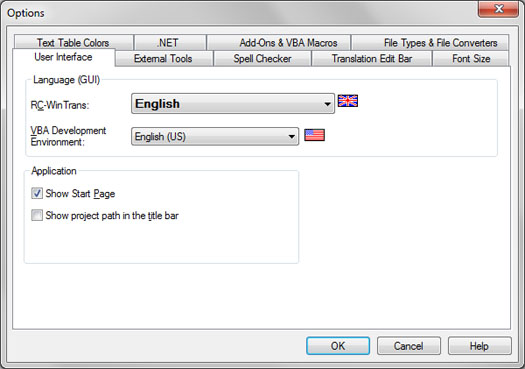
Settings relating to (1.) the appearance of the RC-WinTrans graphical user interface (GUI) and (2.) the check if source files have changed.
Figure: The User Interface property page active in the Options dialog box.
Property Page Elements
·
Language (GUI) Group Box
–
RC-WinTrans Combo Box
Use this combo box to select the language of RC-WinTrans' graphical user interface (GUI).
Available languages: English, French and German.
VBA Development Environment Combo Box
Use this combo box to select the language of the Visual Basic development environment (editor GUI) and the Visual Basic online help.
The VBA development environment is available in twelve (12) languages.
See also: "VBA Help."
Application Group Box
Show Start Page Check Box
Check this option to have the Start page displayed when RC-WinTrans is started.
Show project path in the title bar Check Box
The path of the active translation project will be shown in RC-WinTrans's title bar when this option is selected.
Check for source file changes automatically Check Box
Checked: Automatic check for source file changes. Usually done when the application gets the focus.
Unchecked: use the F5 key to run the check.
A check for changed source file is done at least when a project will be opened.
CRC source file changes check Check Box
Checked (default): A Cyclic Redundancy Check (CRC) is used to check if a source file has changed (recommended).
Unchecked: The "date/time last modified" file attribute is used to see if a source file has changed.